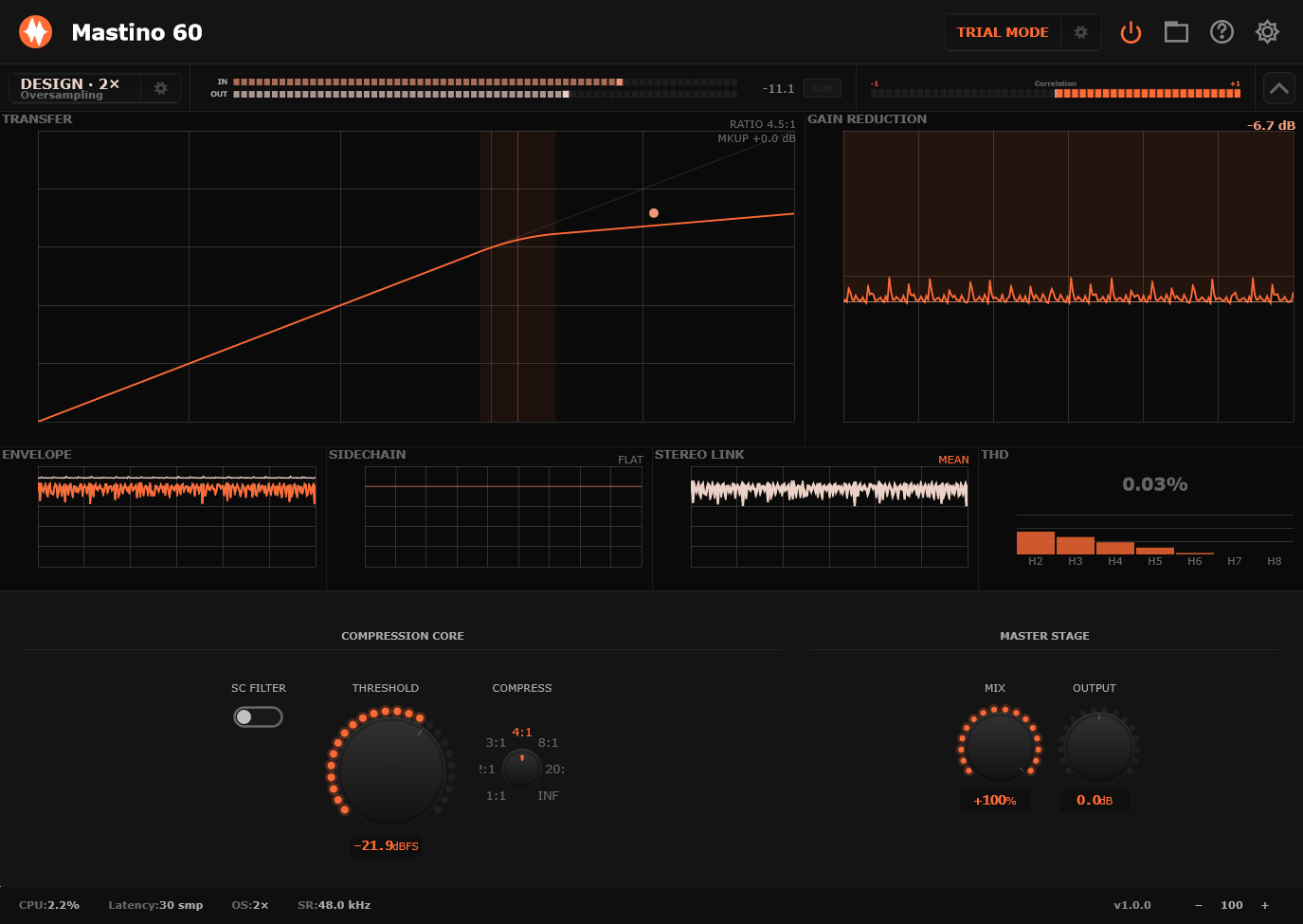
Mastino 60
Overview
Mastino 60 v2.0.0 is a major workflow and interface update. This release rebuilds the plugin around the new MousePlugins v2 editor system, with a clearer graph-first layout, redesigned controls, improved metering, Gain Reduction Intelligence, smarter multiband editing, contextual help, and many stability and usability fixes. Existing projects, presets, licenses, and activations remain compatible.
What's New
AddedMastino 60 has been redesigned with a darker, cleaner, more readable interface. The new layout puts the compressor chart at the center of the workflow, with Input, Output, Global, Gain Reduction Intelligence, and Compression Controls grouped clearly underneath. The header and footer have also been rebuilt with clearer preset handling, A/B controls, undo/redo access, status readouts, CPU display, output mode, and version information.
Improvements
ImprovedAuto Target has been redesigned for better host safety and smoother operation. Mastino no longer writes continuous gain or threshold parameter changes back to the host while Auto Target is active. This fixes crashes and instability that could occur in some hosts, especially when Auto Target was locked across multiple bands. Auto Target now uses an internal runtime offset, keeping the audio behaviour responsive while avoiding unnecessary host automation storms.
The chart now combines more useful information in one place: The selected band tint is now cleaner and more subtle, and is hidden in single-band mode where there is no band split to show.
- transfer curve
- live signal activity
- gain-reduction trace
- Target GR guidance
- per-band knee markers
- band regions
- crossover handles
- integrated input and gain-reduction meters
- band Mix / Mute / Solo interaction zones
After Mastino 60 is activated in one instance, other open demo-mode instances now detect the local license update automatically. This means demo silence is disabled and the license/trial UI updates without requiring a DAW or project reload. The license refresh system is audio-thread safe. The audio path only observes shared license state and does not perform file I/O, validation, network access, locking, allocation, or cryptographic work.
Fixes
Fixed- Fixed a crash that could occur in some hosts when Auto Target / Auto GR was locked.
- Fixed Auto Target host-parameter write storms by moving gain and threshold following to internal runtime state.
- Fixed saved project recall so preset labels and user-tweaked states restore correctly.
- Fixed live crossover movement crackle/noise while audio is playing.
- Fixed host modulation and automation learn from the custom v2 GUI controls.
- Fixed multiband Mid-band isolation and crossover bleed.
- Fixed neighbouring frequencies being pulled down when compressing a single band.
- Fixed the footer Output / Stereo / Mono readout being cut off.
- Fixed clipped text in several larger-text UI areas.
- Fixed chart meter readout clipping.
- Fixed Support & Diagnostics header readability.
- Removed the non-functional Master Bypass button from the Support & Diagnostics page.
Gain Reduction Intelligence
v2.0.0 introduces the new Gain Reduction Intelligence system. It gives you live compression guidance using: The goal is simple: help you reach useful compression amounts faster. Included profile types include Kick, Snare, Drum Bus, Bass, Vocal, Mix Bus, Master, and Custom.
- average gain reduction
- peak gain reduction
- crest information
- source profiles
- draggable Target GR
- Auto Target threshold following
Custom GR profiles
You can now create, edit, save, select, and delete your own Gain Reduction Intelligence profiles directly inside the plugin. Profile editing and delete confirmation use the MousePlugins inline UI, instead of native host popups.
True multiband isolation
Multiband filtering has been rebuilt so Low, Mid, and High now behave as genuinely separate bands. The Mid band no longer lets low-frequency content bleed through its low/mid crossover, and compressing one band no longer audibly pulls down neighbouring frequency ranges. Crossover retuning is also click-free: dragging crossover handles while audio is playing now morphs the filters smoothly, without crackle, noise, or band leakage.
Per-band Mute and Solo
Each multiband band now has small Mute and Solo buttons directly on the chart. Solo is additive across bands and overrides mute. Muted or non-soloed bands are dimmed visually, so it is clear which parts of the signal are currently active.
Contextual Help
Contextual Help is now available for the main chart and key controls. With Help enabled, clicking chart elements opens help for that specific area, including: Help target zones are recalculated when help mode is entered, so they follow the current crossover and band positions.
- compression curve
- integrated meters
- band regions
- crossover handles
- band Mix area
- Mute / Solo controls
Larger and more readable text
Text has been enlarged and cleaned up across the plugin on all platforms. Several clipped labels and readouts have been fixed, including the Support & Diagnostics header, global menu descriptions, output mode footer, and chart meter readouts.
Better clickable feedback
Clickable controls now show a pointing-hand cursor, including knobs, buttons, menu rows, header tools, lane/band selectors, and band Mute/Solo controls. Crossover handles keep their left/right drag cursor.
Other Improvements
- Improved multiband color separation for Low, Mid, and High bands.
- Standardized lane colors for Stereo, Left, Right, Mid, and Side views.
- Rebalanced the bottom control row with more room for Gain Reduction Intelligence.
- Lowered the GR Intelligence meter and Target GR slider for better separation from the telemetry readouts.
- Improved footer balance around the level meters.
- Right-aligned shared header tools consistently.
- Reworked the global menu so descriptions fit better.
- The About row now shows plugin name, version, and license status more clearly.
- Added a dedicated close button to the Support & Diagnostics page.
- Removed inactive or unnecessary header controls while Support & Diagnostics is open.
- Aligned the Sidechain button with the Input/Output Auto buttons.
- Improved knob behaviour and value readability.
- Added consistent precision-control behaviour for dB, Hz, kHz, ms, seconds, percentage, ratio, mix, threshold, gain, crossover, and Q-style values.
- Improved preset display and session recall behaviour.
- New plugin instances open in the init/default state.
- Reopened DAW sessions restore the saved preset label and user-edited state correctly.
Compatibility Notes
Existing projects, presets, licenses, and activations remain compatible. Existing sessions do not need to be changed. The multiband isolation fix makes multiband compression more selective when bands share overlapping content. Single-band and wide-band use is unaffected. Auto Target is designed as a fast setup assistant. You can still override threshold, ratio, gain, band settings, target amount, and mix manually at any time.
Summary
Mastino 60 v2.0.0 is mainly about speed, readability, control clarity, and trust. The sound remains Mastino 60, but the working surface is much clearer: better metering, smarter guidance, safer Auto Target behaviour, cleaner multiband operation, and a more readable interface built for real mixing sessions.