Cambridge Channel Strip
Overview
Cambridge Channel Strip 1.1.0 is a major update to 1.0.x. It recalibrates the complete channel path and all 61 factory programs, makes the TIGHT and BROAD EQ characters distinct, extends the calibrated parameter ranges, adds dynamics activity traces and a revised EQ graph, hardens host automation, state handling and real-time safety in VST3 and CLAP, and reduces the interface's load on the host. Parameter IDs, automation identities and state keys are unchanged. ---
EQ and filters
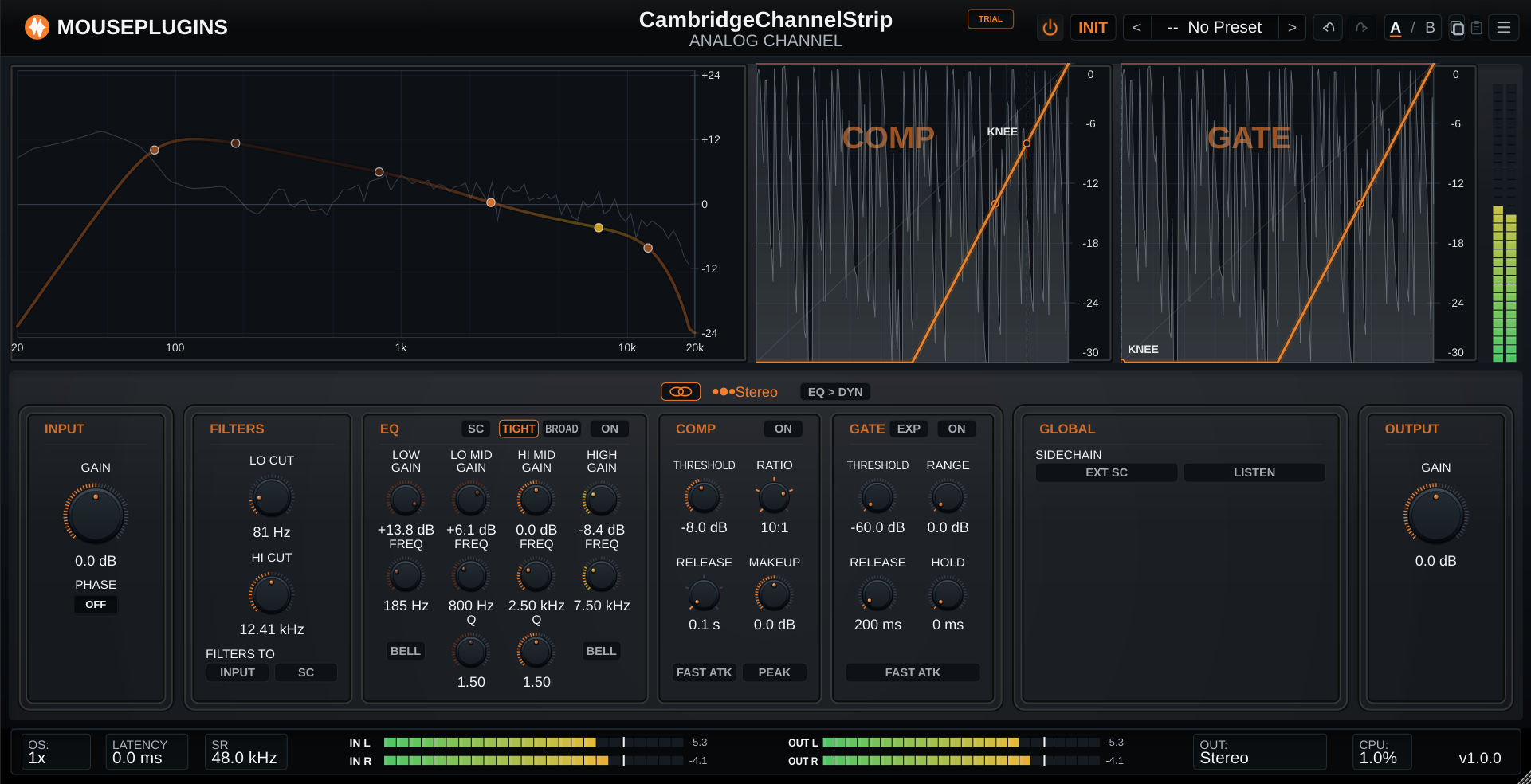
The high- and low-pass filters, including cutoff behaviour and high-sample-rate compensation, and all four EQ bands (Low, Low-Mid, High-Mid and High) are recalibrated. Shelf, bell, gain, frequency and Q behaviour follow the measured control surfaces. A band set to neutral gain remains an exact bypass. TIGHT and BROAD now use distinct measured responses; in 1.0.x both settings produced identical audio. A TIGHT/BROAD switch in the EQ header selects the character, and the EQ graph redraws it immediately.
Compressor and gate/expander
Compressor threshold, ratio, release, peak detection, automatic makeup and timing are recalibrated across the operating range. Gate/expander timing and its interaction with the filtered input are corrected at the measured edge cases. The gate/expander workflow, control identities and routing model are unchanged.
Factory programs and parameter ranges
All 61 factory programs are rebuilt from physical control values and carry new MousePlugins names; program order and settings are unchanged. Calibrated ranges are extended to represent the programs exactly: Compressor Threshold -20 to +10 dBFS, Compressor Ratio 1:1 to the limiter endpoint, Compressor Release 0.1 to 4.0 s, Gate Threshold -60 to +10 dBFS, Low EQ Gain +/-16.5 dB, Low-Mid, High-Mid and High EQ Gain +/-20 dB. Filter frequency, EQ frequency, EQ gain, Q, compressor ratio and compressor release use deterministic physical-value mappings. The exclusive filter destination between the audio input and the dynamics sidechain is corrected.
Graphs
The dynamics graph shows gate/expander activity: attenuation above the knee in red and expansion below it in amber. A switched-off compressor or gate/expander is shown as a thin knee line without activity traces. In the EQ graph, LO CUT and HI CUT are drawn as square tabs with a slope symbol and the four bands as round, labelled points. Filters that are off or not routed to the main signal are drawn dimmed or hollow. The LO CUT and HI CUT curves are drawn only when FILTERS TO INPUT routes them to the main signal, and the band curves include every calibration stage. Points move relative to the grab position, the gain range is fixed at +/-24 dB, and EQ points and buttons show tooltips.
Stereo lanes and controls
INPUT and OUTPUT show both lane gains (GAIN L/R or GAIN M/S) in L/R and M/S, with the link controls in the panel headers. Linked pairs mirror in either direction; gain linking does not change processing mode or graph routing. Dragging an EQ point in the Left/Mid or Right/Side graph selects that lane, so controls and graph always address the same lane. Leaving Stereo for L/R or M/S initialises the Right/Side lane from Left/Mid, including when the change is automated with the editor closed. Knobs respond to the mouse wheel, with Shift for fine steps. Each knob adjustment and each continuous wheel movement is a single named undo step, and simultaneous adjustments no longer share an undo step. A new instance shows "-- Init --" in the preset selector.
Host integration and reliability
VST3 and CLAP automation reaches the audio engine without locks, memory allocation or message-thread work on the render thread. Linked INPUT and OUTPUT gains arrive in each audio block as one consistent pair. Preset recall and state restore apply atomically; the audio thread uses either the previous or the next complete state. The VST3 path no longer takes runtime locks on first process, reactivation, state load, sample-rate or block-size changes, or when the host moves processing to a worker thread, and handles FL Studio's lifecycle pattern without blocking the audio callback. CLAP state and event handoff are hardened. The editor redraws only changed content. In Linux tests in REAPER at 48 kHz, an open editor with no audio playing used at most 1.7% of one CPU core, compared with 15-25% in earlier builds (44-66% at 2x HiDPI scaling). On Linux the plugin returns the host's main thread promptly while its interface is busy, in VST3 and CLAP. The plugin reports its minimum size and aspect ratio to the host when it opens, so host-side resizing keeps the layout in proportion; if a host forces a smaller window, the interface scales to fit.
Compatibility
Parameter IDs, normalisation, automation identities and state keys are unchanged. State schema v2 is introduced; version 1 sessions and presets are migrated automatically and atomically on load. Sessions keep their stored TIGHT/BROAD selection. Because of the recalibration and the now distinct EQ characters, sessions with non-neutral EQ or dynamics settings can sound different from 1.0.x by design. EQ ON enables the four bands; EQ SC moves them from the main audio path to the internal dynamics key. EQ is not applied to both paths at once and is not applied to an external sidechain input.
Known issue
On one Linux system, typing into the preset search field in Bitwig did not work while pasting did. This has not been reproduced. Reports with Bitwig version, distribution, display server (X11 or Wayland), display scaling, audio backend and buffer size are welcome at support@mouseplugins.com. --- Windows 10+ 64-bit and Linux 64-bit (glibc 2.35+: Ubuntu 22.04+, Debian 12+, recent Fedora/Arch). macOS is not supported in this version. Formats: VST3 and CLAP. Sample rates: 44.1 / 48 / 88.2 / 96 / 176.4 / 192 kHz. Offline-first licensing. Support: support@mouseplugins.com